RocketFish RF-WEB2C Instrukcja Użytkownika

Przeglądaj online lub pobierz Instrukcja Użytkownika dla Kamery internetowe RocketFish RF-WEB2C. Rocketfish RF-WEB2C User's Manual Instrukcja obsługi

  • Pobierz
  • Dodaj do moich podręczników
  • Drukuj
  • Strona
    / 2
  • Spis treści
  • BOOKMARKI
  • Oceniono. / 5. Na podstawie oceny klientów
Przeglądanie stron 0
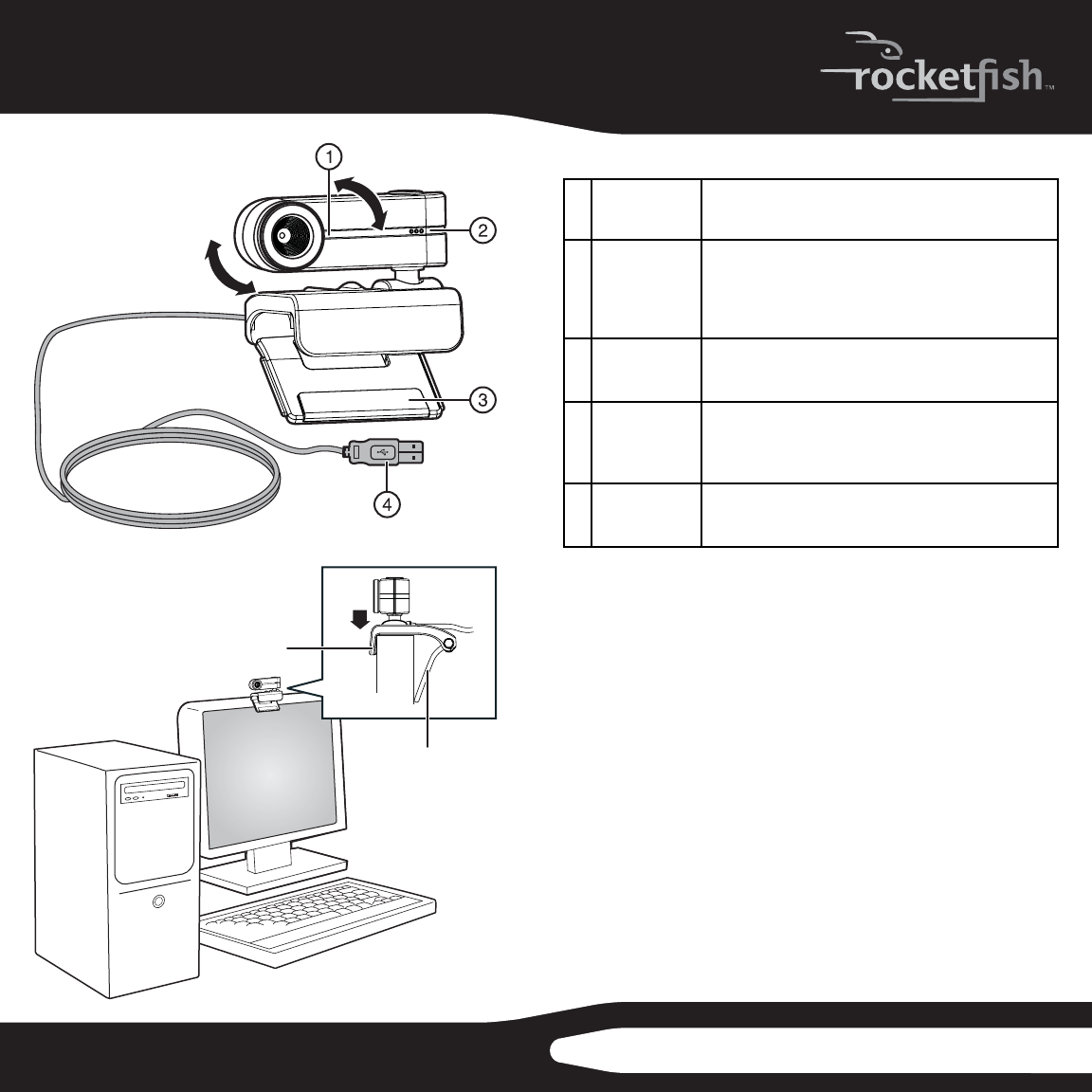
Features/ Fonctionnalités/ Características
# Component
Élément
Elemento
Description/ Descripción
1 Power LED
DEL témoin
d’alimentation
Indicador LED
de encendido
Lights yellow when your webcam is streaming video
S’allume en jaune quand la webcam enregistre de la
vidéo en continu.
Se ilumina color amarillo cuando la cámara web toma
video en continuo.
2 Microphone
Microphone
Micrófono
Captures audio during video chats.
Enregistre l’audio pendant les bavardages avec vidéo.
Captura audio durante las conversaciones por video.
3 Hinged lever
Patte articulée
Palanca
articulada
Use this to mount your webcam to an LCD display panel.
Sert à monter la webcam sur un écran ACL.
Se usa para montar su cámara web en una pantalla de
LCD.
4 USB Cable
Câble USB
Cable de USB
Connects to your computer’s USB port.
Pour connecter au port USB de l’ordinateur.
Se conecta al puerto USB de su computadora.
Installing your webcam
Your webcam is Plug&Play capable, so no installation is needed. However, for
Windows Vista/XP users, installing software will allow full functionality of the
webams features. Install the software and drivers before connecting your webcam.
Software support is not available for Mac systems.
Note: This webcam is compatible with Mac OS X 10.4.9 or higher. The webcam uses the general functionality
provided by OS X and, as such, is limited.
To install your webcam:
1. Insert the Installation CD into your CD or DVD drive. The CD should start
automatically. If it does not, double-click the My Computer icon (or click
Start, then My Computer), right-click the CD-ROM/DVD-ROM drive icon,
then click Autoplay.
2. When prompted, connect your webcams USB cable to your computer.
3. If the Found New Hardware Wizard opens, click No, not this time, then click
Next on this and all subsequent windows.
4. Mount your webcam on your monitor by placing the camera head on top
of the monitor with the mounting lip over the front of the monitor and the
hinged lever on the back.
Rocket sh 2.0 MP Autofocus Webcam
Webcam à mise au point automatique Rocket sh 2 Mpx
Cámara web con autofoco de Rocket sh 2 Mp
SETUP GUIDE • GUIDE D’INSTALLATION • GUÍA DE INSTALACIÓN
RF-WEB2C
mounting lip
languette de montage
borde de montaje
hinged lever
patte articulée
palanca articulada
Przeglądanie stron 0
1 2

Podsumowanie treści

Strona 1 - RF-WEB2C

Features/ Fonctionnalités/ Características# Component ÉlémentElementoDescription/ Descripción1 Power LEDDEL témoin d’alimentationIndicador LED de ence

Strona 2

Using your webcamTo capture images and videos:Click Start, Programs (or All Programs), Rocket sh, Live! Cam, Live! Cam Center. To automatically zoom

Komentarze do niniejszej Instrukcji

Brak uwag

Philips LFH7177/00 manuels

Manuels d'utilisation et guides de l'utilisateur pour Lecteurs de DVD Philips LFH7177/00.
Nous fournissons des manuels en pdf Philips LFH7177/00 à télécharger gratuitement par type de document :


Plus de produits et de manuels pour Lecteurs de DVD Philips

Modèles Type de document
MX5800SA/21 Manuel de l'utilisateur   Philips MX5800SA/21 User's Manual, 49 pages
PET941D/98 Manuel de l'utilisateur   Philips PET941D/98 User's Manual, 2 pages
DVD616K Manuel de l'utilisateur   Philips DVD616K User's Manual, 26 pages
PET721D/98 Manuel de l'utilisateur   Philips PET721D/98 User's Manual, 2 pages
DVP3258X/94 Manuel de l'utilisateur   Philips DVP3268/94 User manual, 52 pages
PET741V/37 Manuel de l'utilisateur    Philips PET741R/37 User manual, 19 pages
HTS6515D/37 Manuel de l'utilisateur   Philips HTS6515D/37 User manual, 52 pages
HTS3500K Manuel de l'utilisateur   Philips HTS3500K User's Manual, 49 pages
DVP 5986K Manuel de l'utilisateur   Philips DVP5986K/96 User manual, 2 pages
DVP3120/12 Manuel de l'utilisateur   Philips DVP3120/12 User manual, 39 pages
DVP2320BL Manuel de l'utilisateur   Philips DVP2320BL User's Manual, 20 pages
PET721D/79 Manuel de l'utilisateur   Philips PET721D/79 User manual, 21 pages
HTS3300/55 Manuel de l'utilisateur    Philips HTS3300/55 Manual de usuario, 4 pages
FWD790/21M Manuel de l'utilisateur   Philips FWD790/21M User manual, 2 pages
DVD 765K Manuel de l'utilisateur   Philips DVD 765K User's Manual, 26 pages
DVD 620/001 Manuel de l'utilisateur   Philips DVD 620/001 User's Manual, 24 pages
DVP5960/37 Manuel de l'utilisateur   Philips DVP5960/37 User manual, 2 pages
DVP5140 Manuel de l'utilisateur   Philips DVP5140 User's Manual, 47 pages
DVD763SA/021 Manuel de l'utilisateur   Philips DVD763SA/021 User's Manual, 64 pages
DVP5992 Manuel de l'utilisateur   Philips DVP5992 User's Manual, 2 pages